
VEIN is a new post-apocalyptic multiplayer survival game with full dedicated server support. This guide shows you how to set up, configure, and join your own VEIN dedicated server using HostByte’s optimized game panel.
Step 1 — Order and Access Your Server
- Visit HostByte VEIN Hosting and select VEIN.
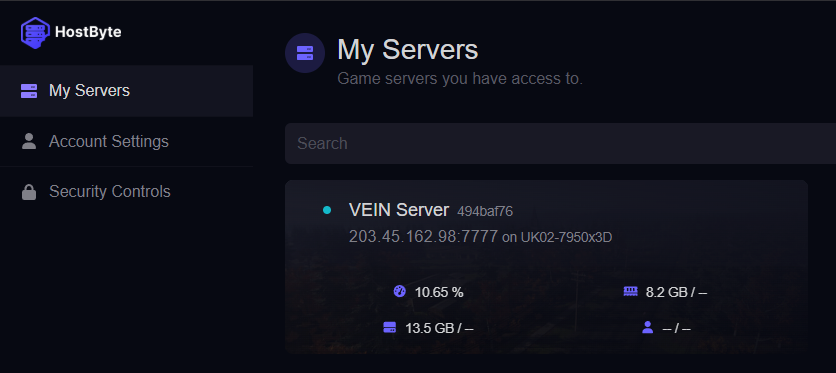
- After checkout, open the HostByte Game Panel.
- Your VEIN server will automatically install and appear under Servers.
Step 2 — Initial Startup
- Select your VEIN server → click Start.
- Wait for the console to show:
Step 3 — Join Your Server
VEIN supports both public and direct connect methods.
Option A — Public Server List
- From the main menu, click Join Server.
- Search your Server Name (The name you put when you ordered the server, or in Startup Parameters or in game.ini).
- Select → Join.
Option B — Direct Connect (recommended)
- Open the in-game console (~ or F1).
- Type:
open YOUR.SERVER.IP:7777
Press Enter — you’ll connect immediately if the server is online.
Tip: Use the Steam favorites tab if the in-game list is empty. Add your server as IP:27015 (query port).

Step 4 — Configure Server Settings
To edit Server Settings you can Use the Game Panel with pre-setup Configurations or edit the (game.ini) file
Editing Configs — Startup Parameters
- Select your VEIN server on the Hostbyte Game panel and navigate to Startup Parameters.
- Inside here you have a pre-setup configs for ease of use.
Editing game.ini — File Manager
- Navigate to the File Manager in your game panel.
- Open:
Vein/Saved/Config/LinuxServer/Game.ini
- Edit values under the relevant headers, for example:
[/Script/Vein.VeinGameSession]
ServerName=My VEIN Base
Password=myserverpass
MaxPlayers=16
SuperAdminSteamIDs=76561198000000000

[ConsoleVariables]
vein.Difficulty=2
vein.LootMultiplier=1.0
vein.TimeMultiplier=16
vein.PvP=True
- Click Save and Restart the server.
Issue with configs not working:
- Some Configs are not hooked yet or are not working as intended: VEIN is still in early release, while in our config options in Startup Parameters we have settings for (PVP and Offline Raid Protection) These are ready to be used in server configs but functionally do not work as intended as of right now, within the next coming updates should work, while (Permadeath) does work it's been reported to have De-sync issues, and sometimes not working for some players.
Getting Help
- Knowledge Base: Explore more VEIN guides (server ports, admin setup, saving & backups).
- Support Ticket: Log in to your HostByte account to open a ticket.
- Discord: Join our community:
- Status Page: Check maintenance/outages: status.hostbyte.net.